
Notice
Recent Posts
Recent Comments
Link
250x250
| 일 | 월 | 화 | 수 | 목 | 금 | 토 |
|---|---|---|---|---|---|---|
| 1 | 2 | 3 | 4 | 5 | 6 | 7 |
| 8 | 9 | 10 | 11 | 12 | 13 | 14 |
| 15 | 16 | 17 | 18 | 19 | 20 | 21 |
| 22 | 23 | 24 | 25 | 26 | 27 | 28 |
Tags
- Attention
- Data Viz
- AI Math
- ODQA
- 현대자동차
- N2N
- 2023 현대차·기아 CTO AI 경진대회
- Optimization
- Ai
- 데이터 시각화
- passage retrieval
- dataset
- RNN
- 딥러닝
- seaborn
- pyTorch
- matplotlib
- N21
- 기아
- Self-attention
- mrc
- AI 경진대회
- Transformer
- 데이터 구축
- word2vec
- Bart
- GPT
- Bert
- KLUE
- nlp
Archives
- Today
- Total
쉬엄쉬엄블로그
(Data Viz) Seaborn 기초 실습 - 5 (Matrix API) 본문
728x90
이 색깔은 주석이라 무시하셔도 됩니다.
Seaborn 기초 실습
기본적인 분류 5가지의 기본적인 종류의 통계 시각화와 형태 살펴보기
- Categorical API
- Distribution API
- Relational API
- Regression API
- Matrix API
라이브러리와 데이터셋 호출
import numpy as np
import pandas as pd
import matplotlib as mpl
import matplotlib.pyplot as plt
import seaborn as sns

print('seaborn version : ', sns.__version__)

"""
seaborn version :  0.11.2
"""
student = pd.read_csv('./StudentsPerformance.csv')
student.head()
5. Matrix Plots
5-1. Heatmap
히트맵은 다양한 방식으로 사용될 수 있다. 대표적으로는 상관관계(correlation) 시각화에 많이 사용된다.
student.corr()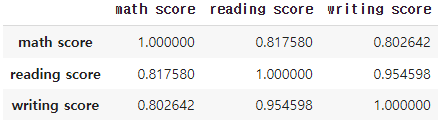
이런 상관관계는 다양한 방법이 있는데, pandas에서는 다음과 같은 방법을 제공한다.
더 자세한 상관관계는 scatter plot과 reg plot으로 살펴보는 것 추천한다.
- Pearson Linear correlation coefficient
- 모수적 방법(두 변수의 정규성 가정), 연속형 & 연속형 변수 사이의 선형 관계 검정, (-1,1)사이의 값을 가지며 0으로 갈수록 선형 상관관계가 없다는 해석 가능
- Spearman Rank-order correlation coefficient
- 비모수적 방법(정규성 가정 x), 연속형 & 연속형 변수 사이의 단조 관계 검정, 값에 순위를 매겨 순위에 대한 상관성을 계수로 표현 - 연속형 변수가 아닌 순서형 변수에도 사용 가능 단조성(monotonicity) 평가 - 곡선 관계도 가능
- kendall Rank-order correlation coefficient
- 비모수적 방법(정규성 가정 x), 연속형 & 연속형 변수 사이의 단조 관계 검정, 값에 순위를 매겨 순위에 대한 상관성을 계수로 표현함 - 연속형 변수가 아닌 순서형 변수에도 사용 가능 단조성(monotonicity) 평가. 일반적으로 Spearman의 rho 상관 관계보다 값이 작다. 일치/불일치 쌍을 기반으로 계산하며 오류에 덜 민감
성적은 모두 선형성이 강하므로 Heart Disease 데이터셋을 사용하여 시각화해보자.
heart = pd.read_csv('./heart.csv')
heart.head()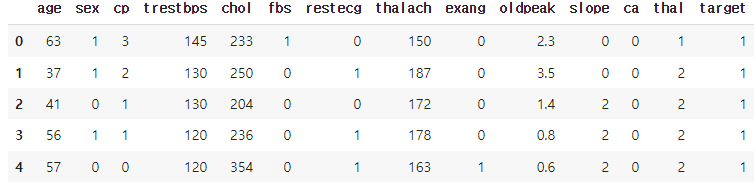
heart.corr()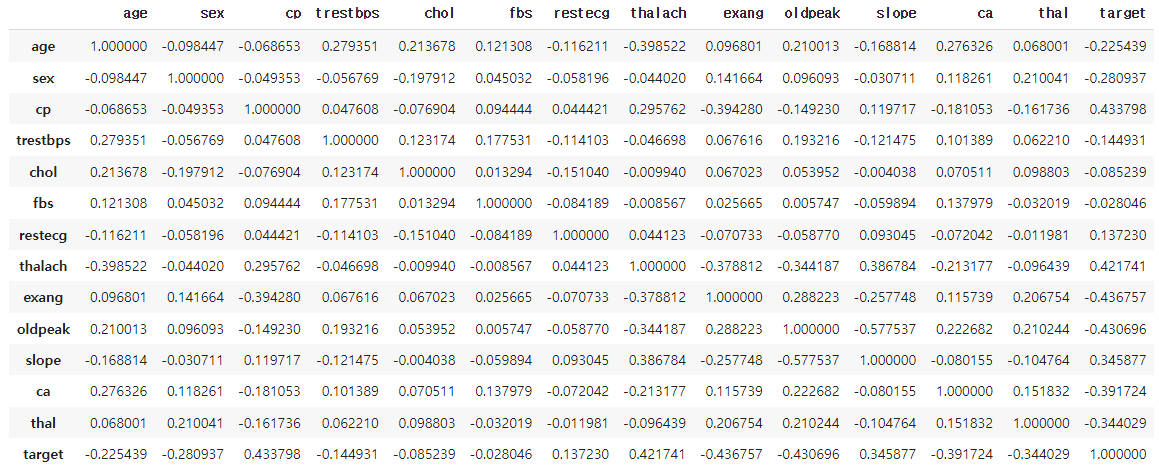
fig, ax = plt.subplots(1,1 ,figsize=(7, 6))
sns.heatmap(heart.corr(), ax=ax)
plt.show()
상관계수는 -1~1까지이므로 색의 범위를 맞추기 위해 vmin과 vmax로 범위를 조정한다.
fig, ax = plt.subplots(1,1 ,figsize=(7, 6))
sns.heatmap(heart.corr(), ax=ax,
           vmin=-1, vmax=1
           )
plt.show()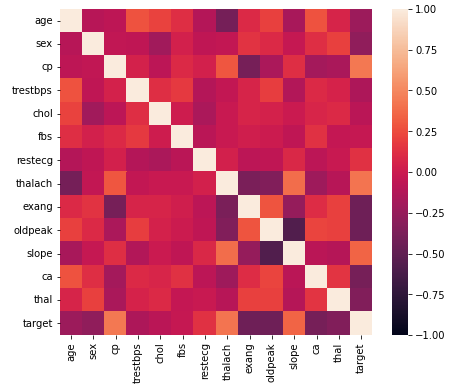
0을 기준으로 음/양이 중요하므로 center를 지정해줄 수도 있다.
fig, ax = plt.subplots(1,1 ,figsize=(7, 6))
sns.heatmap(heart.corr(), ax=ax,
           vmin=-1, vmax=1, center=0
           )
plt.show()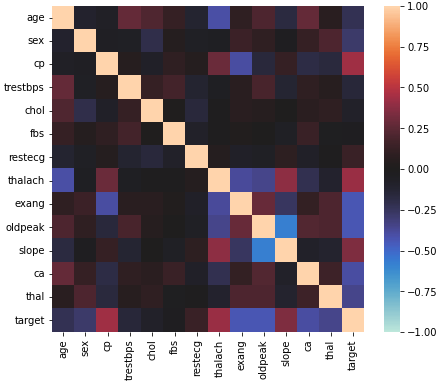
cmap을 바꿔 가독성을 높이고 음/양이 정반대의 의미를 가지니 diverse colormap인 coolwarm을 사용했다.
fig, ax = plt.subplots(1,1 ,figsize=(10, 9))
sns.heatmap(heart.corr(), ax=ax,
           vmin=-1, vmax=1, center=0,
            cmap='coolwarm'
           )
plt.show()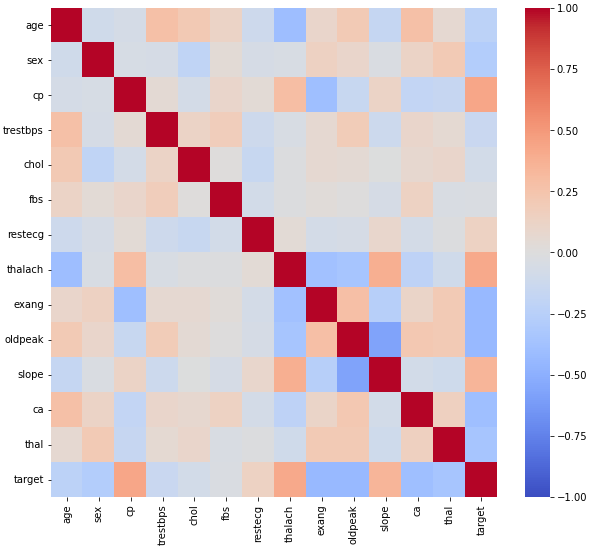
annot와 fmt를 사용하면 실제 값에 들어갈 내용을 작성할 수 있다.
fig, ax = plt.subplots(1,1 ,figsize=(10, 9))
sns.heatmap(heart.corr(), ax=ax,
           vmin=-1, vmax=1, center=0,
            cmap='coolwarm',
            annot=True, fmt='.2f' # 정수형이면 d
           )
plt.show()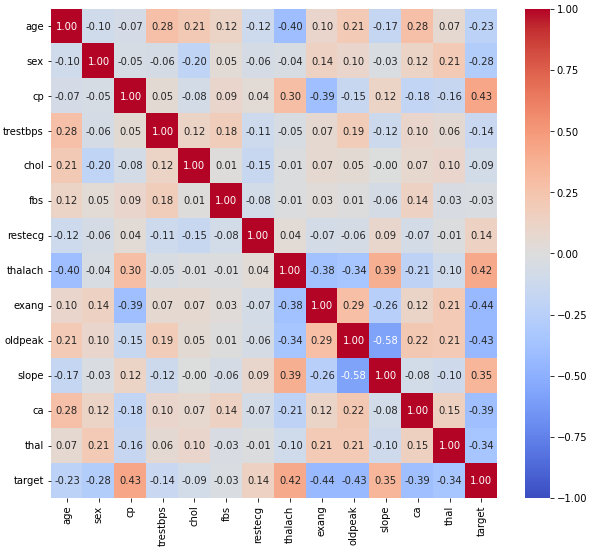
linewidth를 사용하여 칸 사이를 나눌 수도 있다.
그리고 square를 사용하여 정사각형을 사용할 수도 있다.
fig, ax = plt.subplots(1,1 ,figsize=(10, 9))
sns.heatmap(heart.corr(), ax=ax,
           vmin=-1, vmax=1, center=0,
            cmap='coolwarm',
            annot=True, fmt='.2f',
            linewidth=0.1,
           )
plt.show()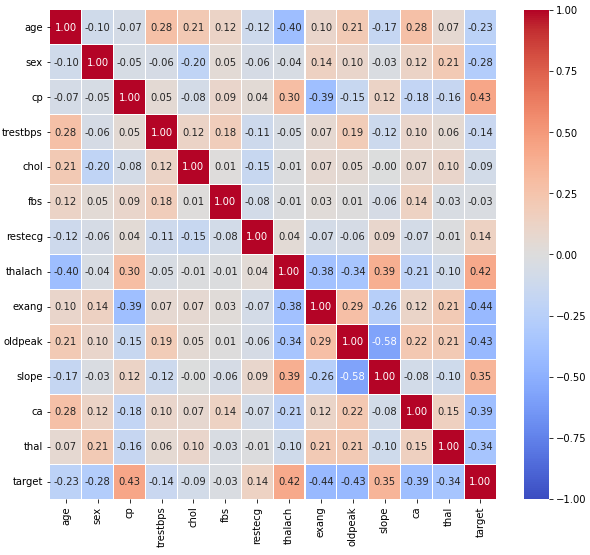
fig, ax = plt.subplots(1,1 ,figsize=(12, 9))
sns.heatmap(heart.corr(), ax=ax,
           vmin=-1, vmax=1, center=0,
            cmap='coolwarm',
            annot=True, fmt='.2f',
            linewidth=0.1, square=True
           )
plt.show()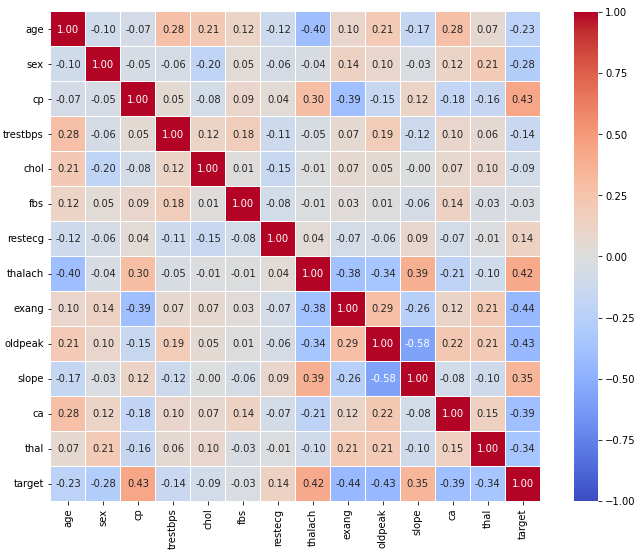
대칭인 경우나 특정 모양에 따라 필요없는 부분을 지울 수도 있다.
fig, ax = plt.subplots(1,1 ,figsize=(10, 9))

mask = np.zeros_like(heart.corr())
mask[np.triu_indices_from(mask)] = True

sns.heatmap(heart.corr(), ax=ax,
           vmin=-1, vmax=1, center=0,
            cmap='coolwarm',
            annot=True, fmt='.2f',
            linewidth=0.1, square=True, cbar=False,
            mask=mask
           )
plt.show()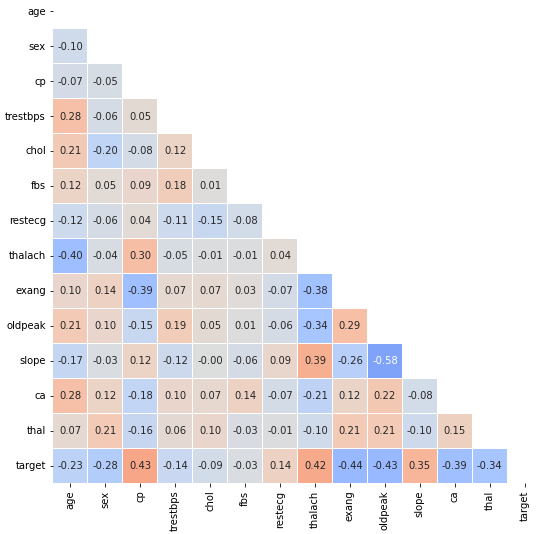
출처: 부스트캠프 AI Tech 4기(NAVER Connect Foundation)
'부스트캠프 AI Tech 4기' 카테고리의 다른 글
| (Data Viz) Polar Coordinate - Rador Plot (0) | 2023.07.01 |
|---|---|
| (Data Viz) Polar Coordinate - Polar Plot (0) | 2023.06.30 |
| (Data Viz) Seaborn 기초 실습 - 4 (Relational API, Regression API) (0) | 2023.06.28 |
| (Data Viz) Seaborn 기초 실습 - 3 (Distribution API) (0) | 2023.06.27 |
| (Data Viz) Seaborn 기초 실습 - 2 (Categorical API) (0) | 2023.06.24 |
'부스트캠프 AI Tech 4기' Related Articles
more


Comments