
Notice
Recent Posts
Recent Comments
Link
250x250
| 일 | 월 | 화 | 수 | 목 | 금 | 토 |
|---|---|---|---|---|---|---|
| 1 | 2 | 3 | 4 | 5 | 6 | 7 |
| 8 | 9 | 10 | 11 | 12 | 13 | 14 |
| 15 | 16 | 17 | 18 | 19 | 20 | 21 |
| 22 | 23 | 24 | 25 | 26 | 27 | 28 |
Tags
- Ai
- AI 경진대회
- ODQA
- 현대자동차
- passage retrieval
- KLUE
- AI Math
- GPT
- 딥러닝
- RNN
- Bart
- N2N
- Self-attention
- Data Viz
- pyTorch
- Bert
- 데이터 시각화
- 데이터 구축
- Attention
- dataset
- Optimization
- matplotlib
- seaborn
- 2023 현대차·기아 CTO AI 경진대회
- mrc
- nlp
- N21
- 기아
- Transformer
- word2vec
Archives
- Today
- Total
쉬엄쉬엄블로그
(Data Viz) Polar Coordinate - Rador Plot 본문
728x90
이 색깔은 주석이라 무시하셔도 됩니다.
Radar Plot
Radar Plot
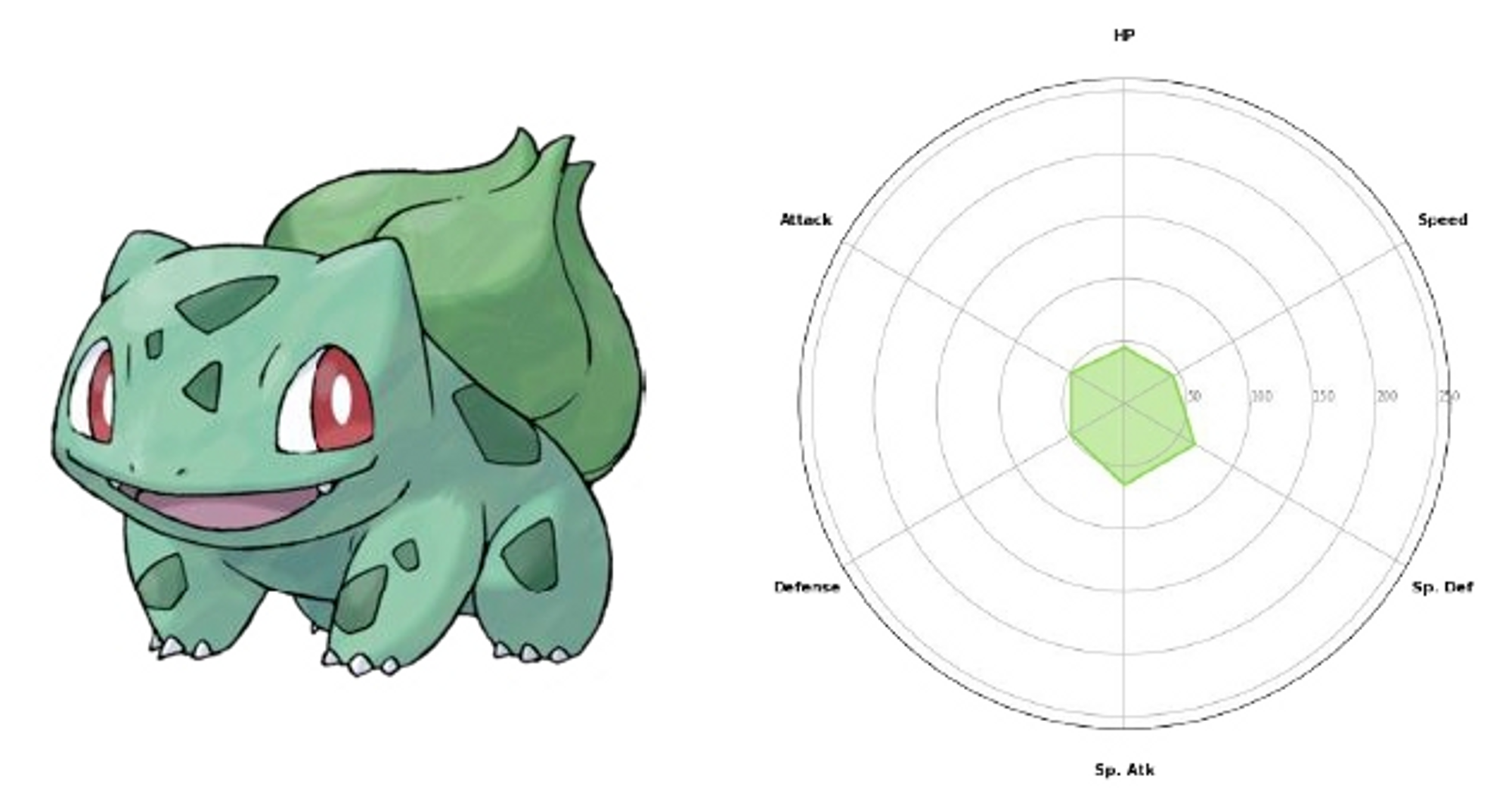
- 극좌표계를 사용하는 대표적인 차트
- 별 모양으로 생겨 Star Plot으로 불리기도 함
- 중심점을 기준으로 N개의 변수 값을 표현할 수 있음
- 데이터의 Quality를 표현하기에 좋음
- 캐릭터의 강함
- 운동 선수 분석 (게임 및 방송 등)
- 비교에도 적합
Radar Chart 주의점
- 각 feature는 독립적이며, 척도가 같아야 함
- 순서형 변수와 수치형 변수가 함께 있다면 고려 필요
- 자동차를 예시로 든다면?
- 안전성 평가, 소비자 만족도 등 5점 만점
- 최대 속도, 연비 등 절대적 수치
- 과연 하나의 Radar Plot에 표현하는 게 맞을까?
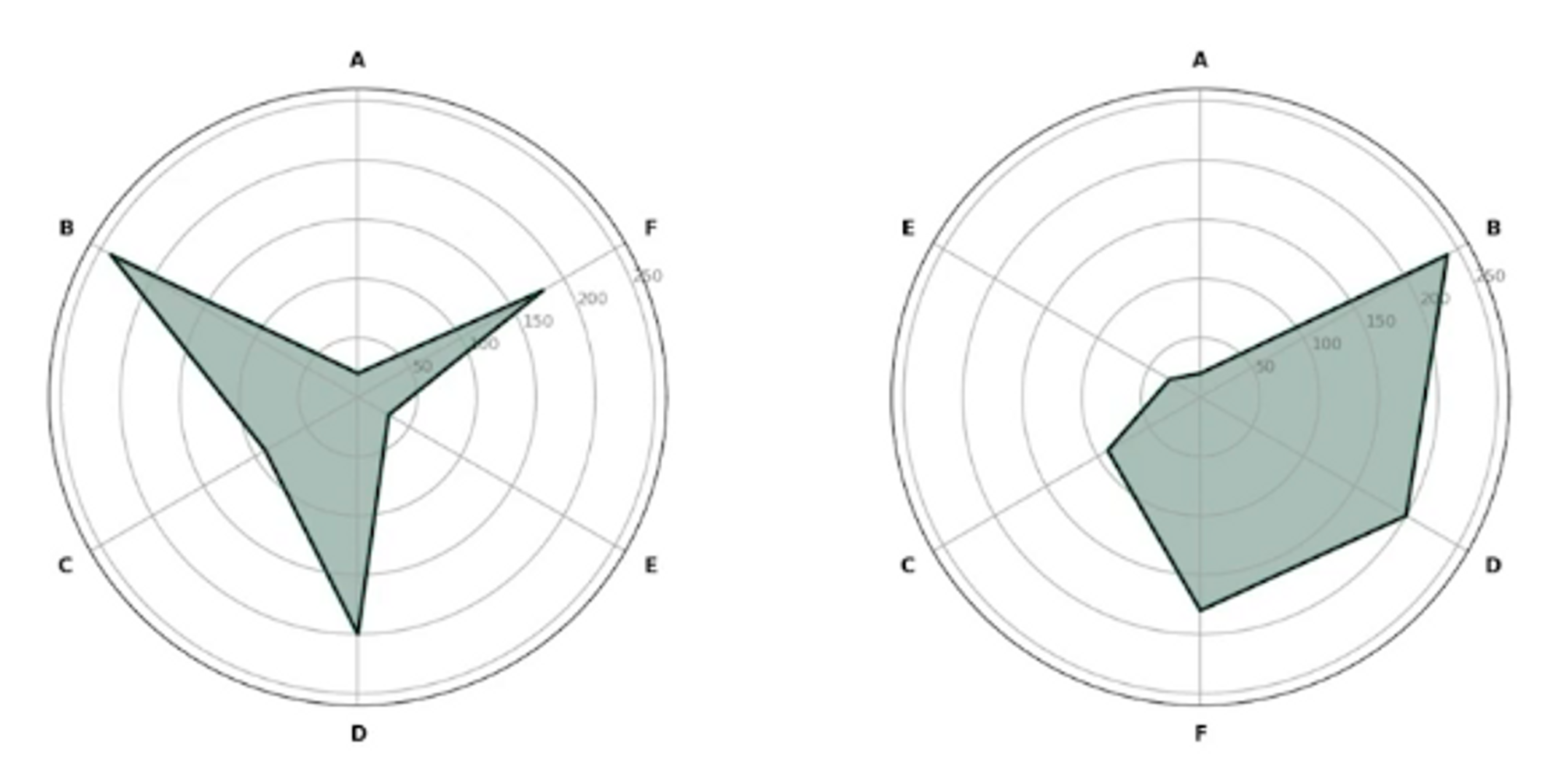
- 다각형의 면적이 중요해 보이지만 feature의 순서에 따라 많이 달라짐
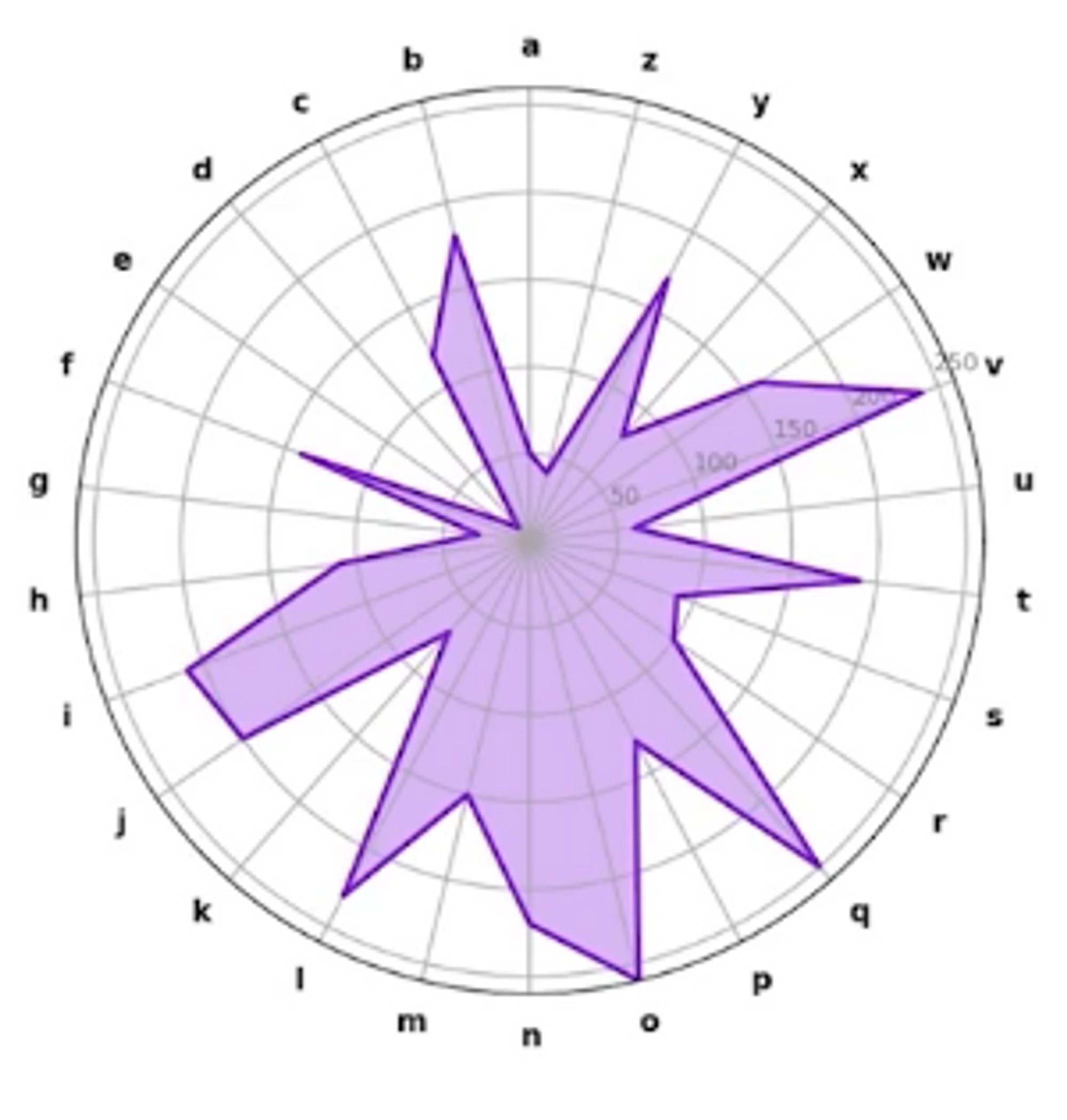
- Feature가 많아질수록 가독성이 떨어짐
2. Radar Chart
2-1. Radar Chart 기본 틀 구성
위의 polar coordinate의 fill을 적합하게 사용하면 Radar Chart를 사용할 수 있다.
Pokemon with Stat(https://www.kaggle.com/abcsds/pokemon) 데이터셋을 사용
pokemon = pd.read_csv('./pokemon.csv')
pokemon.head()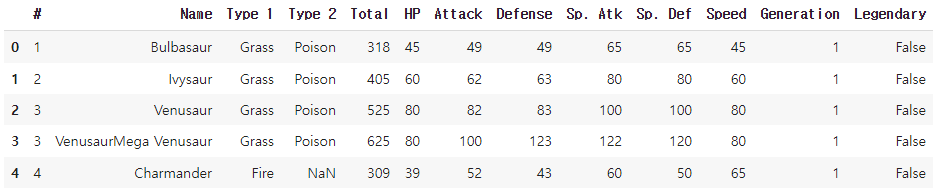
pokemon.describe()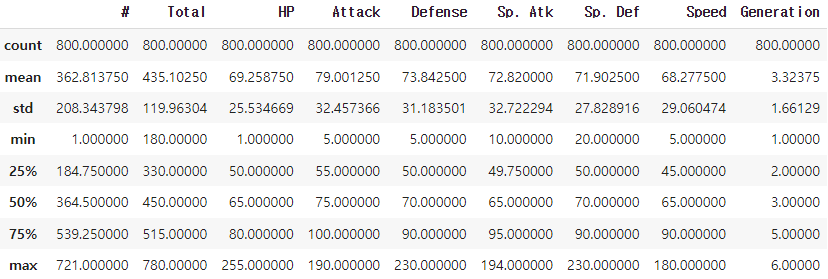
데이터셋을 살펴보면 HP, Attack, Defense, Sp.Atk, Sp.Def, Speed 총 6가지 요소가 포켓몬의 역량을 나타내는 수치이다.
6개의 요소의 통계를 보면 얼추 비슷한 스케일임을 알 수 있다. 이를 fill을 사용하여 그린다.
stats = ["HP", "Attack", "Defense", "Sp. Atk", "Sp. Def", "Speed"]
values = pokemon.iloc[0][stats].to_list()
print(values)

'''
[45, 49, 49, 65, 65, 45]
'''
각은 2$\pi$를 6등분하면 된다.
theta = np.linspace(0, 2*np.pi, 6, endpoint=False)
print(theta)

'''
[0.         1.04719755 2.0943951  3.14159265 4.1887902  5.23598776]
'''fill과 plot을 사용하면 다음과 같이 그릴 수 있다.
fig = plt.figure()
ax = fig.add_subplot(111, projection='polar')

ax.plot(theta, values)
ax.fill(theta, values, alpha=0.5)
plt.show()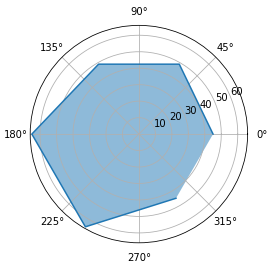
끝 점을 포함하기 위해 마지막 데이터를 포함시킨다.
fig = plt.figure()
ax = fig.add_subplot(111, projection='polar')

values.append(values[0])
theta = theta.tolist() + [theta[0]]

ax.plot(theta, values)
ax.fill(theta, values, alpha=0.5)

plt.show()

print(values)
print(theta)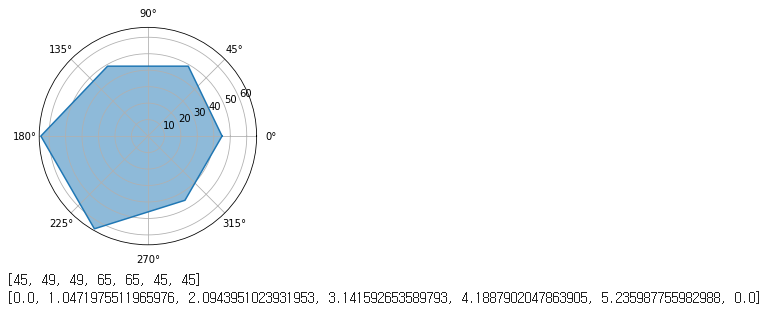
2-2. 커스텀 및 조정
set_thetagrids: 각도에 따른 그리드 및 ticklabels 변경set_theta_offset: 시작 각도 변경
fig = plt.figure(figsize=(4, 4))
ax = fig.add_subplot(111, projection='polar')

values = pokemon.iloc[0][stats].to_list()
values.append(values[0])

ax.plot(theta, values)
ax.fill(theta, values, alpha=0.5)

ax.set_thetagrids([n*60 for n in range(6)], stats)
ax.set_theta_offset(np.pi/2)

plt.show()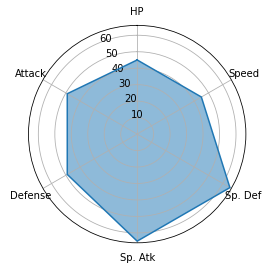
3개의 순차적 데이터를 비교하는 방법
fig = plt.figure(figsize=(14, 4))

for idx in range(3):
    ax = fig.add_subplot(1,3,idx+1, projection='polar')

    values = pokemon.iloc[idx][stats].to_list()
    values.append(values[0])


    ax.plot(theta, values, color='forestgreen')
    ax.fill(theta, values, color='forestgreen', alpha=0.3)

    ax.set_rmax(100)
    ax.set_thetagrids([n*60 for n in range(6)], stats)
    ax.set_theta_offset(np.pi/2)

plt.show()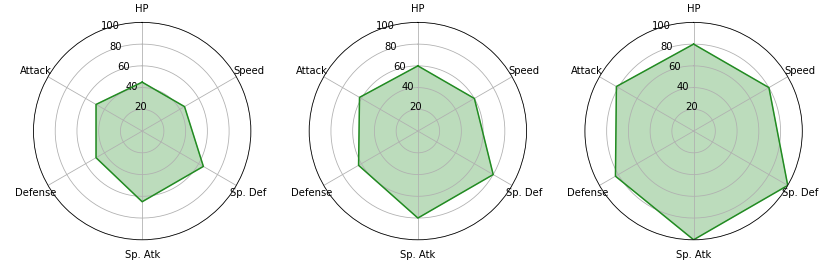
fig = plt.figure(figsize=(7, 7))

ax = fig.add_subplot(111, projection='polar')

for idx in range(3):
    values = pokemon.iloc[idx][stats].to_list()
    values.append(values[0])

    ax.plot(theta, values, color='forestgreen')
    ax.fill(theta, values, color='forestgreen', alpha=0.3)

ax.set_rmax(110)
ax.set_thetagrids([n*60 for n in range(6)], stats)
ax.set_theta_offset(np.pi/2)

plt.show()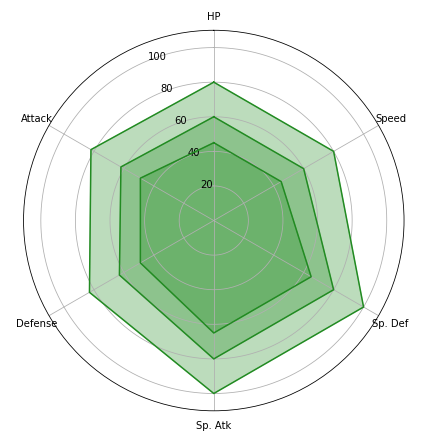
출처: 부스트캠프 AI Tech 4기(NAVER Connect Foundation)
'부스트캠프 AI Tech 4기' 카테고리의 다른 글
| (NLP) Transformer - 1 (0) | 2023.07.04 |
|---|---|
| (Data Viz) Pie, Donut, Sunburst Chart (Pie, Donut Chart 실습) (0) | 2023.07.03 |
| (Data Viz) Polar Coordinate - Polar Plot (0) | 2023.06.30 |
| (Data Viz) Seaborn 기초 실습 - 5 (Matrix API) (2) | 2023.06.29 |
| (Data Viz) Seaborn 기초 실습 - 4 (Relational API, Regression API) (0) | 2023.06.28 |
'부스트캠프 AI Tech 4기' Related Articles
more


Comments