
Notice
Recent Posts
Recent Comments
Link
250x250
| 일 | 월 | 화 | 수 | 목 | 금 | 토 |
|---|---|---|---|---|---|---|
| 1 | 2 | 3 | 4 | 5 | 6 | 7 |
| 8 | 9 | 10 | 11 | 12 | 13 | 14 |
| 15 | 16 | 17 | 18 | 19 | 20 | 21 |
| 22 | 23 | 24 | 25 | 26 | 27 | 28 |
Tags
- Self-attention
- dataset
- GPT
- ODQA
- N2N
- 기아
- word2vec
- matplotlib
- Attention
- 딥러닝
- Ai
- RNN
- N21
- AI Math
- Transformer
- Data Viz
- 현대자동차
- pyTorch
- Bart
- passage retrieval
- 데이터 시각화
- Optimization
- KLUE
- nlp
- seaborn
- 2023 현대차·기아 CTO AI 경진대회
- AI 경진대회
- 데이터 구축
- Bert
- mrc
Archives
- Today
- Total
쉬엄쉬엄블로그
(Data Viz) Bar Plot 실습 본문
728x90
1. 기본 Bar Plot
bar(): 기본적인 bar plotbarh(): horizontal bar plot
!pip install matplotlib==3.3.2


import numpy as np
import pandas as pd
import matplotlib as mpl
import matplotlib.pyplot as plt


fig, axes = plt.subplots(1, 2, figsize=(12, 7))

x = list('ABCDE')
y = np.array([1, 2, 3, 4, 5])

axes[0].bar(x, y)
axes[1].barh(x, y)

plt.show()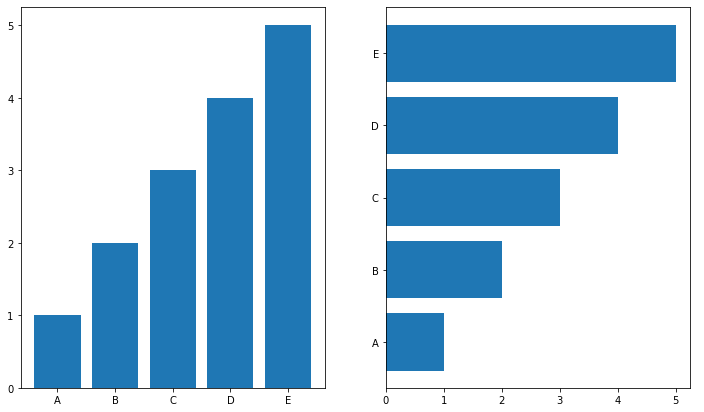
# 막대 그래프의 색은 다음과 같이 변경을 전체로 하거나, 개별로 할 수도 있다.
# 개별로 할 때는 막대 개수와 같이 색을 리스트로 전해야 한다.

fig, axes = plt.subplots(1, 2, figsize=(12, 7))

x = list('ABCDE')
y = np.array([1, 2, 3, 4, 5])

clist = ['blue', 'gray', 'gray', 'gray', 'red']
color = 'green'
axes[0].bar(x, y, color=clist)
axes[1].barh(x, y, color=color)

plt.show()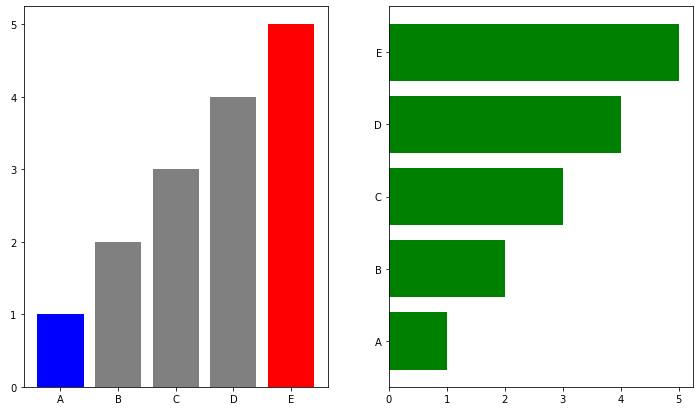
2. 다양한 Bar Plot
데이터 : http://roycekimmons.com/tools/generated_data/exams
Exam Scores
Tools → Data Generators OverviewThis is a fictional dataset and should only be used for data science training purposes.This data set includes scores from three exams and a variety of personal, social, and economic factors that have interaction effects up
roycekimmons.com
- 1000명 학생 데이터
- feature에 대한 정보는
head(),describe(),info()등으로 확인 unique(),value_counts()등으로 종류나 큰 분포 확인- feature들
- 성별 : female / male
- 인종민족 : group A, B, C, D, E
- 부모님 최종 학력 : 고등학교 졸업, 전문대, 학사 학위, 석사 학위, 2년제 졸업
- 점심 : standard와 free/reduced
- 시험 예습 : none과 completed
- 수학, 읽기, 쓰기 성적 (0~100)
student = pd.read_csv('./StudentsPerformance.csv')
student.sample(5)
- 그룹에 따른 정보 시각화
성별에 따른 race/ethincity 분포
group = student.groupby('gender')['race/ethnicity'].value_counts().sort_index()
display(group)
print(student['gender'].value_counts())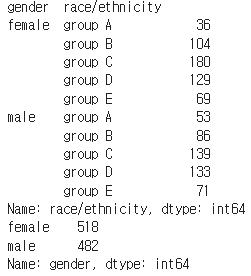
2-1. Multiple Bar Plot
fig, axes = plt.subplots(1, 2, figsize=(15, 7))
axes[0].bar(group['male'].index, group['male'], color='royalblue')
axes[1].bar(group['female'].index, group['female'], color='tomato')
plt.show()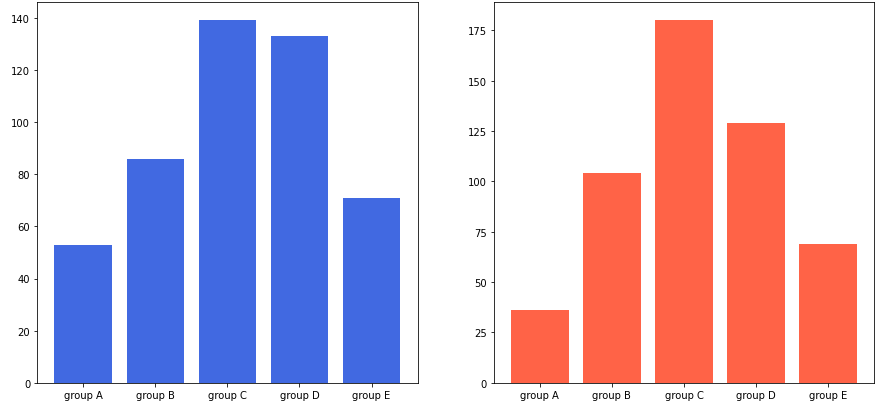
- 각 barplot은 자체적으로 y 범위를 맞추기에 좀 더 y축의 범위를 공유할 수 있다.
- 방법1은 subplot을 만들 때,
sharey파라미터를 사용하는 방법이다.
fig, axes = plt.subplots(1, 2, figsize=(15, 7), sharey=True)
axes[0].bar(group['male'].index, group['male'], color='royalblue')
axes[1].bar(group['female'].index, group['female'], color='tomato')
plt.show()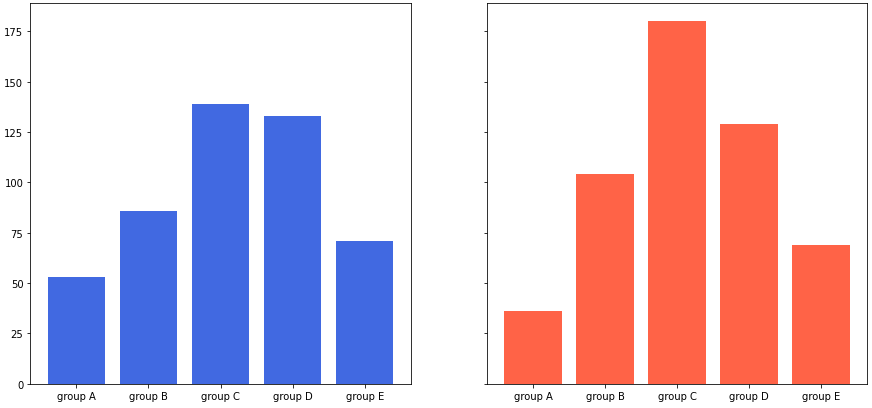
- 방법2는 y축 범위를 개별적으로 조정하는 방법이다. 반복문을 사용하여 조정할 수 있다.
- Group간의 비교가 어렵다는 단점이 있다.
fig, axes = plt.subplots(1, 2, figsize=(15, 7))
axes[0].bar(group['male'].index, group['male'], color='royalblue')
axes[1].bar(group['female'].index, group['female'], color='tomato')

for ax in axes:
    ax.set_ylim(0, 200)

plt.show()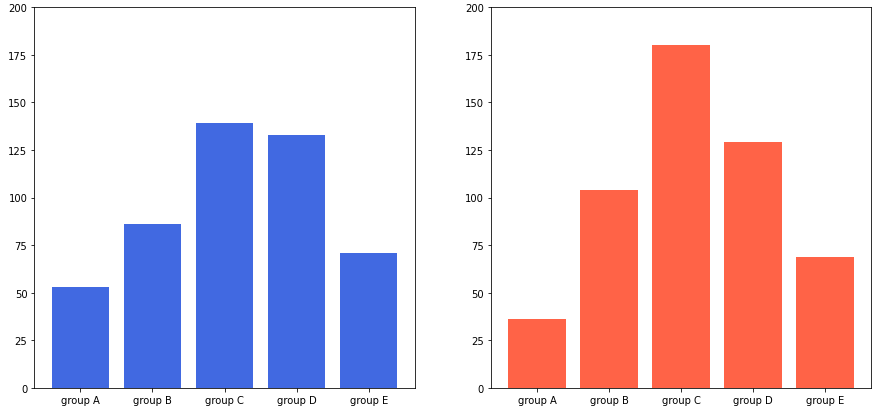
2-2. Stacked Bar Plot
- 쌓아서 보면 그룹 A, B, C, D, E에 대한 전체 비율은 알기 쉽다.
bottom파라미터를 사용해서 아래 공간을 비워둘 수 있다.
fig, axes = plt.subplots(1, 2, figsize=(15, 7))

group_cnt = student['race/ethnicity'].value_counts().sort_index()
axes[0].bar(group_cnt.index, group_cnt, color='darkgray')
axes[1].bar(group['male'].index, group['male'], color='royalblue')
axes[1].bar(group['female'].index, group['female'], bottom=group['male'], color='tomato')

for ax in axes:
    ax.set_ylim(0, 350)

plt.show()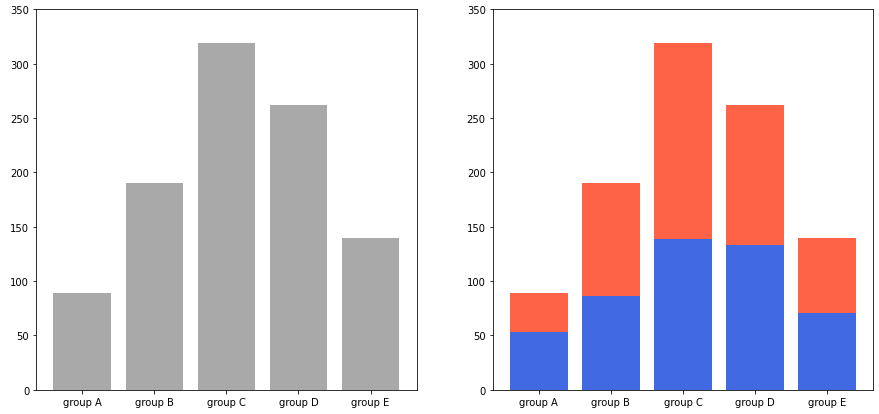
2-3. Percentage Stacked Bar Plot
fig, ax = plt.subplots(1, 1, figsize=(12, 7))

group = group.sort_index(ascending=False) # 역순 정렬
total=group['male']+group['female'] # 각 그룹별 합


ax.barh(group['male'].index, group['male']/total,
        color='royalblue')

ax.barh(group['female'].index, group['female']/total,
        left=group['male']/total,
        color='tomato')

ax.set_xlim(0, 1)
for s in ['top', 'bottom', 'left', 'right']:
    ax.spines[s].set_visible(False) # spines : 테두리

plt.show()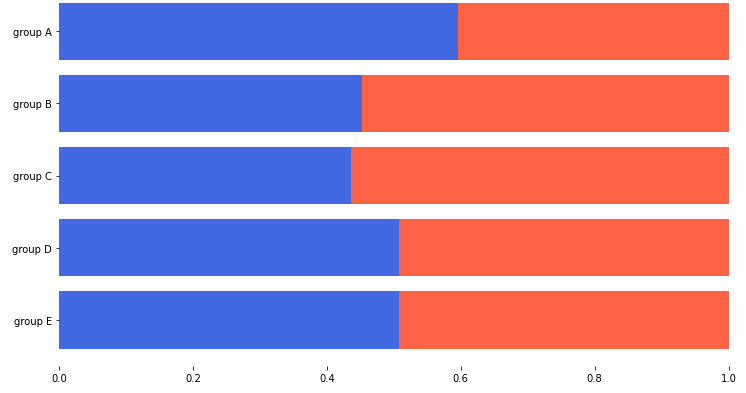
2-4. Overlapped Bar Plot
- 겹치는 투명도는 꼭 정해진 것이 아닌 다양한 실험을 통해 선택하면 된다.
group = group.sort_index() # 다시 정렬

fig, axes = plt.subplots(2, 2, figsize=(12, 12))
axes = axes.flatten()

for idx, alpha in enumerate([1, 0.7, 0.5, 0.3]):
    axes[idx].bar(group['male'].index, group['male'],
                  color='royalblue',
                  alpha=alpha)
    axes[idx].bar(group['female'].index, group['female'],
                  color='tomato',
                  alpha=alpha)
    axes[idx].set_title(f'Alpha = {alpha}')

for ax in axes:
    ax.set_ylim(0, 200)


plt.show()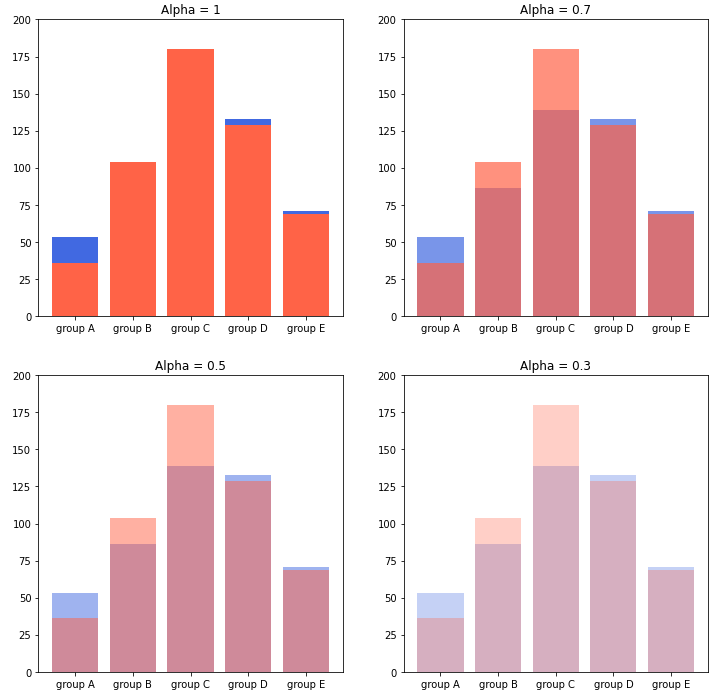
2-5. Grouped Bar Plot
- 3가지 테크닉
- x축 조정
width조정xticks,xticklabels
- 원래 x축이 0, 1, 2, 3로 시작한다면
- 한 그래프는 0-width/2, 1-width/2, 2-width/2 로 구성하면 되고
- 한 그래프는 0+width/2, 1+width/2, 2+width/2 로 구성하면 된다.
fig, ax = plt.subplots(1, 1, figsize=(12, 7))

idx = np.arange(len(group['male'].index))
width=0.35

ax.bar(idx-width/2, group['male'],
       color='royalblue',
       width=width)

ax.bar(idx+width/2, group['female'],
       color='tomato',
       width=width)

ax.set_xticks(idx)
ax.set_xticklabels(group['male'].index)

plt.show()
- 추가적으로 label + legend를 달아 색에 대한 설명도 추가하면 좋다.
fig, ax = plt.subplots(1, 1, figsize=(12, 7))

idx = np.arange(len(group['male'].index))
width=0.35

ax.bar(idx-width/2, group['male'],
       color='royalblue',
       width=width, label='Male')

ax.bar(idx+width/2, group['female'],
       color='tomato',
       width=width, label='Female')

ax.set_xticks(idx)
ax.set_xticklabels(group['male'].index)
ax.legend()

plt.show()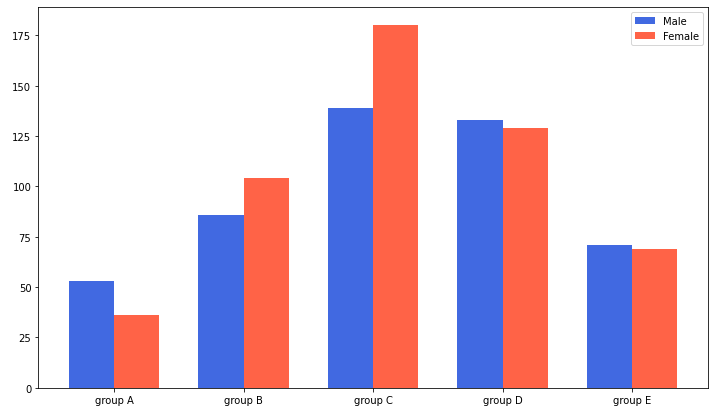
- 그룹의 개수에 따른 x좌표
- 2개 : -1/2, +1/2
- 3개 : -1, 0, +1 (-2/2, 0, +2/2)
- 4개 : -3/2, -1/2, +1/2, +3/2
- $-\frac{N-1}{2}$에서 $\frac{N-1}{2}$까지 분자에 2간격으로 커지는 것이 특징이다.
- index i(zero-index)에 대해서는 다음과 같이 x좌표를 계산할 수 있다.
$x+\frac{-N+1+2\times i}{2}\times width$ - 인종/민족 그룹에 따른 Parental Level of Education Grouped Bar Plot
group = student.groupby('parental level of education')['race/ethnicity'].value_counts().sort_index()
group_list = sorted(student['race/ethnicity'].unique())
edu_lv = student['parental level of education'].unique()

fig, ax = plt.subplots(1, 1, figsize=(13, 7))

x = np.arange(len(group_list))
width=0.12

for idx, g in enumerate(edu_lv):
    ax.bar(x+(-len(edu_lv)+1+2*idx)*width/2, group[g],
       width=width, label=g)

ax.set_xticks(x)
ax.set_xticklabels(group_list)
ax.legend()

plt.show()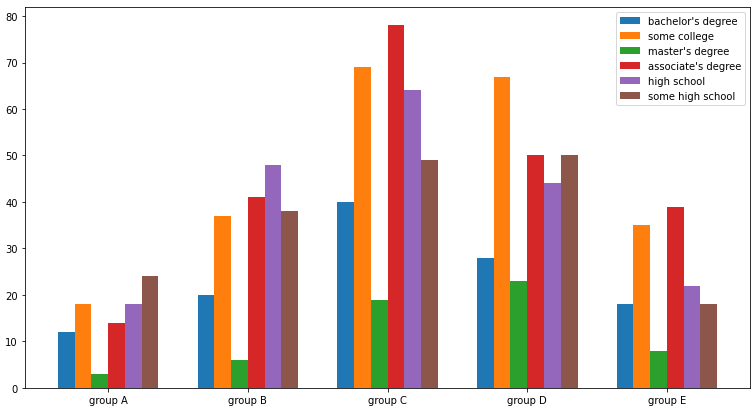
3. 정확한 Bar Plot
3-1. Principle of Proportion Ink
- 성별에 따른 성적을 막대그래프로 비교
score = student.groupby('gender').mean().T
score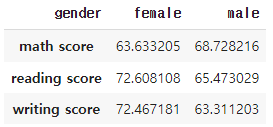
fig, axes = plt.subplots(1, 2, figsize=(15, 7))

idx = np.arange(len(score.index))
width=0.3

for ax in axes:
    ax.bar(idx-width/2, score['male'],
           color='royalblue',
           width=width)

    ax.bar(idx+width/2, score['female'],
           color='tomato',
           width=width)

    ax.set_xticks(idx)
    ax.set_xticklabels(score.index)

axes[0].set_ylim(60, 75)

plt.show()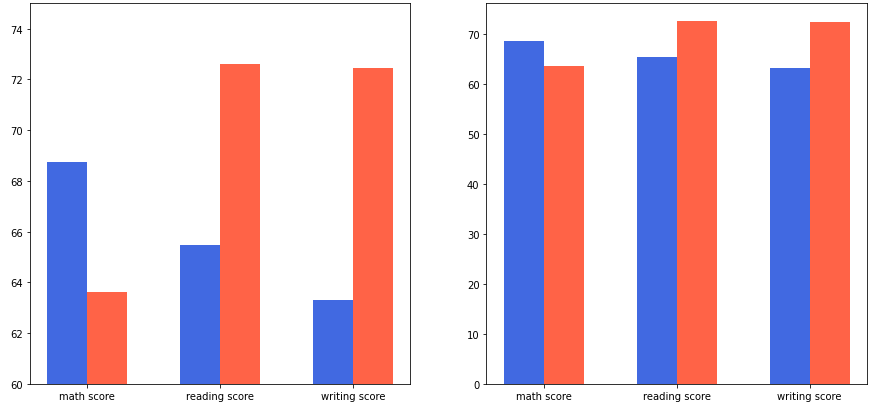
- 비교를 위한다면 세로를 늘리는게 더 좋을 수 있다.
fig, ax = plt.subplots(1, 1, figsize=(6, 10))

idx = np.arange(len(score.index))
width=0.3

ax.bar(idx-width/2, score['male'],
       color='royalblue',
       width=width)

ax.bar(idx+width/2, score['female'],
       color='tomato',
       width=width)

ax.set_xticks(idx)
ax.set_xticklabels(score.index)


plt.show()
3-2. 적절한 공간 활용
- X/Y axis Limit (
.set\_xlim(),.set\_ylime()) - Margins (
.margins()) - Gap (
width) - Spines (
.spines\[spine\].set\_visible())
group_cnt = student['race/ethnicity'].value_counts().sort_index()

fig = plt.figure(figsize=(15, 7))

ax_basic = fig.add_subplot(1, 2, 1)
ax = fig.add_subplot(1, 2, 2)

ax_basic.bar(group_cnt.index, group_cnt)
ax.bar(group_cnt.index, group_cnt,
       width=0.7,
       edgecolor='black',
       linewidth=2,
       color='royalblue'
      )

ax.margins(0.1, 0.1)

for s in ['top', 'right']:
    ax.spines[s].set_visible(False)

plt.show()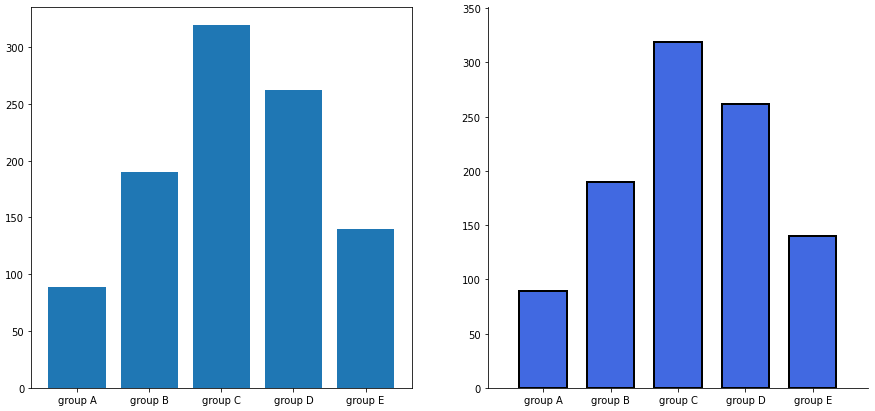
3-3. 복잡함과 단순함
group_cnt = student['race/ethnicity'].value_counts().sort_index()

fig, axes = plt.subplots(1, 2, figsize=(15, 7))

for ax in axes:
    ax.bar(group_cnt.index, group_cnt,
           width=0.7,
           edgecolor='black',
           linewidth=2,
           color='royalblue',
           zorder=10
          )

    ax.margins(0.1, 0.1)

    for s in ['top', 'right']:
        ax.spines[s].set_visible(False)

axes[1].grid(zorder=0)

for idx, value in zip(group_cnt.index, group_cnt):
    axes[1].text(idx, value+5, s=value,
                 ha='center',
                 fontweight='bold'
                )

plt.show()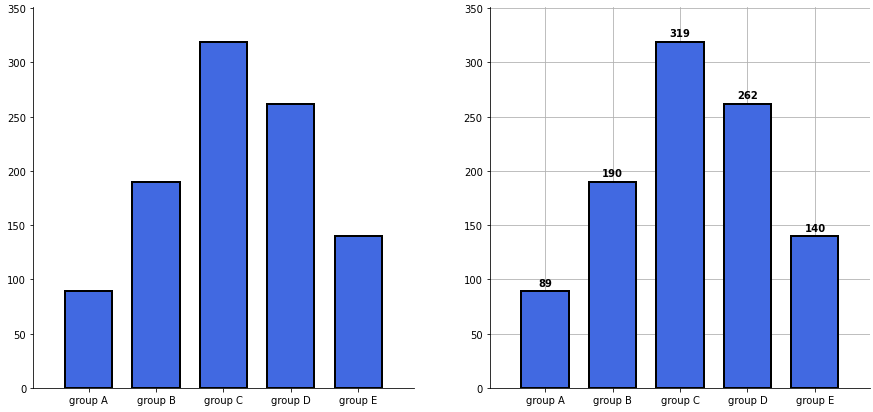
3-4. ETC
- 오차막대(errorbar)를 사용하여 편차 등의 정보를 추가
score_var = student.groupby('gender').std().T
score_var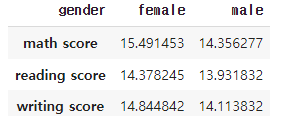
fig, ax = plt.subplots(1, 1, figsize=(10, 10))

idx = np.arange(len(score.index))
width=0.3


ax.bar(idx-width/2, score['male'],
       color='royalblue',
       width=width,
       label='Male',
       yerr=score_var['male'],
       capsize=10
      )

ax.bar(idx+width/2, score['female'],
       color='tomato',
       width=width,
       label='Female',
       yerr=score_var['female'],
       capsize=10
      )

ax.set_xticks(idx)
ax.set_xticklabels(score.index)
ax.set_ylim(0, 100)
ax.spines['top'].set_visible(False)
ax.spines['right'].set_visible(False)

ax.legend()
ax.set_title('Gender / Score', fontsize=20)
ax.set_xlabel('Subject', fontweight='bold')
ax.set_ylabel('Score', fontweight='bold')

plt.show()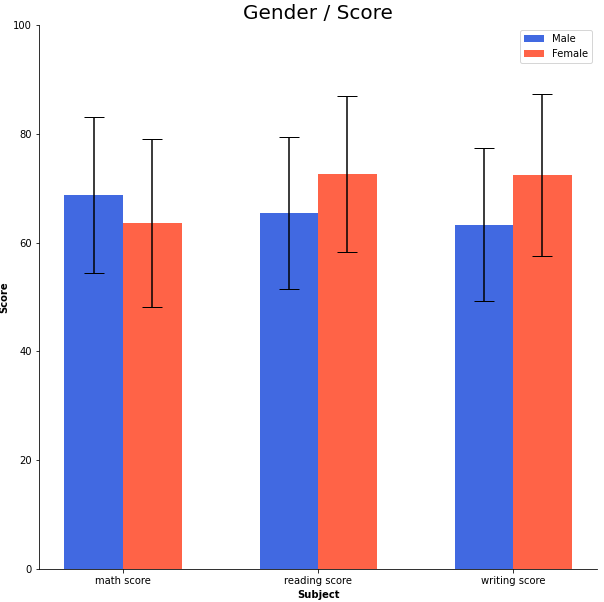
출처: 부스트캠프 AI Tech 4기(NAVER Connect Foundation)
'부스트캠프 AI Tech 4기' 카테고리의 다른 글
| (Data Viz) Line Plot 실습 (0) | 2023.06.10 |
|---|---|
| (Data Viz) Line Plot (0) | 2023.06.10 |
| (Data Viz) Bar Plot (1) | 2023.06.08 |
| (Data Viz) Python과 Matplotlib (0) | 2023.06.07 |
| (Data Viz) 시각화의 요소 상태 (2) | 2023.06.06 |
'부스트캠프 AI Tech 4기' Related Articles
more


Comments